
August 19, 2026 · 8 min read
Upvotes वाला audience Q&A
ऐसा Q&A खोलिए जिसमें कमरा सवाल भेजे और upvote करे, तय कीजिए क्या screen पर जाए, और वह जवाब दीजिए जो ज़्यादातर लोग पूछना चाहते हैं।
हर खुले सवाल-जवाब सत्र में एक ही गड़बड़ी होती है: जो माइक के सबसे पास खड़ा है, वही तय कर देता है कि बात किस दिशा में जाएगी। एक आत्मविश्वासी आवाज़ बहुत सीमित-सा सवाल पूछती है, कमरा शिष्टता से सुनता रहता है, और जो बात चालीस लोग असल में पूछना चाहते थे वह कभी कही ही नहीं जाती। सवाल बोर्ड इसे ठीक कर देता है: लोग अपने सवाल लिखते हैं और दूसरों के सवालों को वोट देते हैं, इसलिए स्क्रीन पर वही पहुँचता है जिसका जवाब कमरा चाहता है, न कि वह जो सबसे पहले खड़ा हो गया।
What a Q&A page does
A Q&A page is not a poll. Instead of picking from options you wrote, people type a question of their own, and everyone else can upvote the ones they also want answered. You see the queue ranked by votes and choose what goes on the main screen. Three things happen at once: quiet people get a voice, near-duplicates collapse into one well-voted question, and you get a live read on what the room actually came for.
Add a Q&A page to your deck
Add the page
In the editor, click Add page and choose Q&A from the question type list. Give it a prompt that invites specifics: "What do you want to ask the panel?" gets better questions than "Questions?".
Decide whether to moderate
Open Answering and timing and check Moderation. With it on, every question lands in an approval queue and nothing appears on the main screen until you approve it. With it off, questions go straight to the board and the room ranks them itself.
Tip
इस गाइड को समझने के लिए तकनीकी जानकारी की ज़रूरत नहीं है। हर चरण में PollsLive के साधारण बटन इस्तेमाल होते हैं, न कोई कोडिंग, न आपके दर्शकों के लिए कोई ऐप।
Open the room
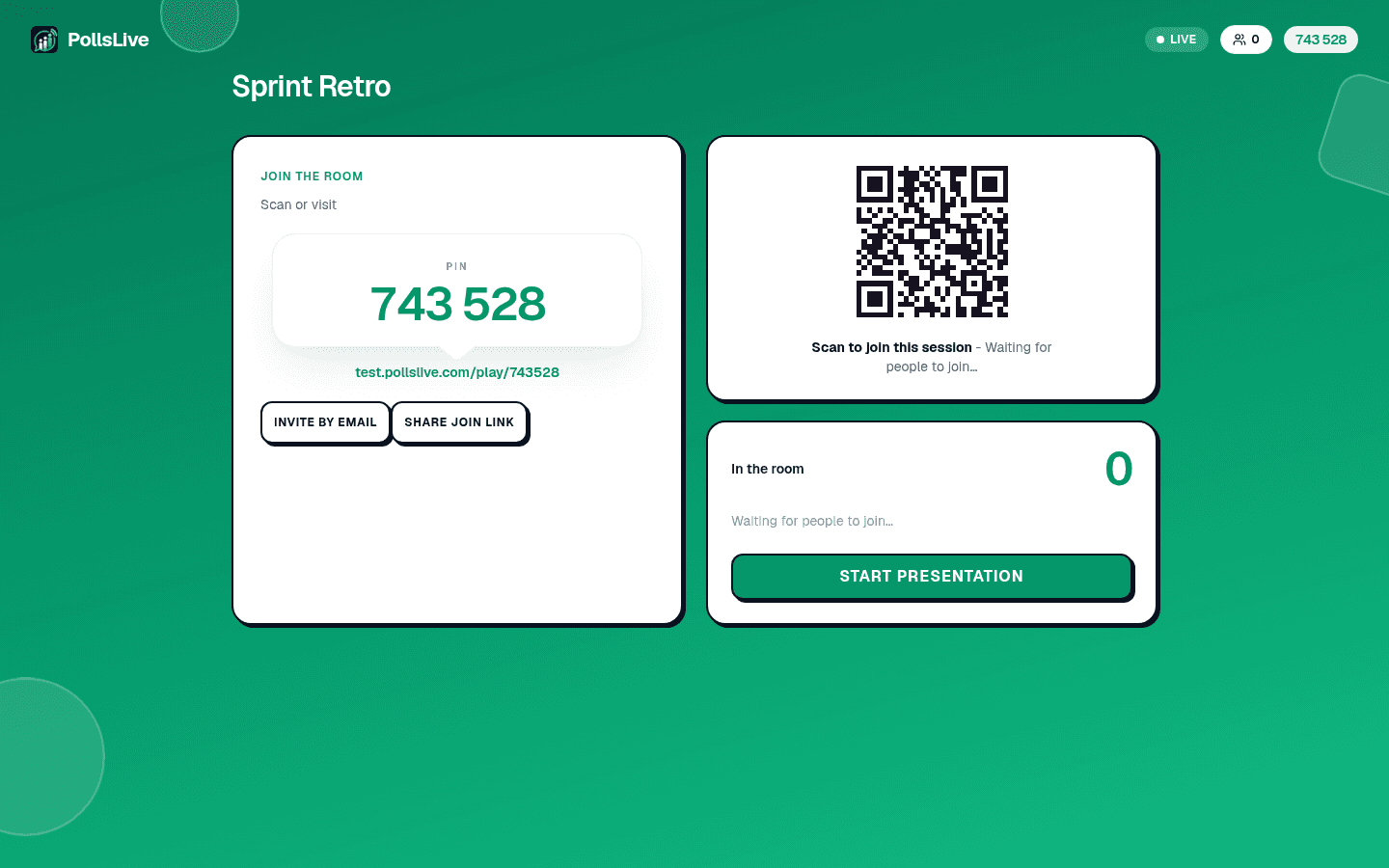
Click Present live. The host console puts a 6-digit PIN and a QR code on screen. People join from any browser: no app, no account, no waiting for an invite.
Work the queue
Questions arrive in the Moderation panel with a pending count. Approve the ones worth the room's time, hide the rest. Approved questions move to the board and start collecting upvotes, and the board reorders itself as votes land.
Tip
Read the top question out loud before you answer it, and say how many people upvoted it. It tells the room the board is real, and it makes the next person more likely to post rather than wait.
Q&A पेज क्या करता है
Q&A पेज कोई पोल नहीं है। आपके लिखे विकल्पों में से चुनने के बजाय हर व्यक्ति अपना सवाल टाइप करता है, और बाकी सब उन सवालों को वोट दे सकते हैं जिनका जवाब वे भी चाहते हैं। आपको कतार वोटों के हिसाब से क्रम में दिखती है और आप तय करते हैं कि मुख्य स्क्रीन पर क्या जाएगा। तीन चीज़ें एक साथ होती हैं: चुप रहने वालों को आवाज़ मिलती है, लगभग एक जैसे सवाल एक ही अच्छे वोट वाले सवाल में सिमट जाते हैं, और आपको लाइव पता चलता रहता है कि कमरा आया किसलिए है।
Important
Upvotes measure interest, not importance. A hard question about layoffs may sit under a fun one and still be the one you have to answer. The board is a signal, not an instruction.
अपने डेक में Q&A पेज जोड़ें
Participants answer without an account, so nothing ties a question to an identity unless you turn name collection on. Leave it off for anything sensitive: a pulse on management, a safety concern, a question someone would not put their name to in a room of colleagues. That is usually the whole reason the board exists.
After the session
Every question, its vote count and whether you approved it are in the results. Export the session to CSV or a PDF report and you have a ranked list of what your audience wanted to know, which is the most useful artefact of the whole event, and the one that usually gets lost when Q&A happens on a microphone.
See live audience Q&A at conferences for the room-management side, and anonymous town hall and employee pulse for the internal version.
Spin up a live poll right now. Free sign-in for you, no app or account for your audience.
Create a free poll